Back then, employee learning ran on one clear idea – people showed up together, then and there, to learn. Now that idea feels outdated. With remote teams at different places, clocks, and daily rhythms, meeting like that just does not work anymore. So when things change, those tools meant for school gyms or lecture halls often fall behind.
Away from offices, learning now plays a key role in how teams adapt. When place doesn’t matter, timing gets looser, schedules less fixed. Instead of rare sessions, growth happens steadily alongside tasks.
There are tools that make execution real, tested methods gathered here so efforts don’t repeat mistakes already faced elsewhere.
What Is Remote Training?
Learning for employees who aren’t at the same physical place happens through web-based tools. These setups let people join from wherever they are. Teachers standing in front of students or stacks of paper manuals are now irrelevant. Digital spaces now handle sending, organizing, and monitoring and measuring lessons.
Common Formats Used in Remote Training
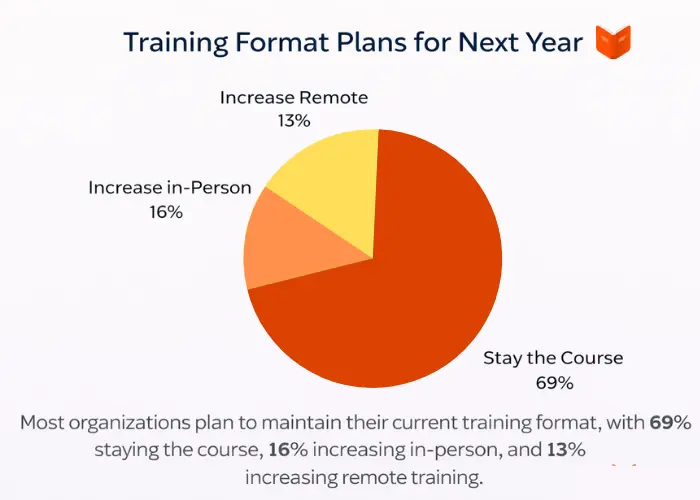
People usually tune into online sessions for
- Self-paced courses employees can complete independently
- Live talks happen online for chatting or learning
- Recorded lessons and knowledge libraries
- Assessments, quizzes, and practical assignments
- Peer learning through discussion spaces
How Remote Training Is Structured
What stands out when someone asks about remote training? It’s less about location, more about how things are set up. Learning away from a single classroom often follows a steady rhythm, tracked clearly, and stays open to anyone who needs it later. Those moments tucked into busy weeks replace isolated events that vanish fast.
Why Is There an Increasing Need for Remote Training?
More people now want corporate training they can do from home. It fits better into busy lives these days.
One big reason people want remote training is because old-style classes often fall short when schedules get messy. Not just that – working long hours while commuting wastes the time needed for growth. With digital tools available now, learning on your own timeline feels more realistic than before. Employers see this too; remote learning is less about skipping effort and more about matching growth to how days actually unfold.
New duties appear without clear directions. Adaptation isn’t gradual anymore – it rushes ahead. Skills need to be updated often, never just a few times a year.
Faster onboarding now faces a stronger push. Early contribution from new staff grows more expected, even if companies still depend on uneven, manager-specific learning methods. Still, remote lessons help lock in consistent teaching across roles, adapting fast when needed.
Is Virtual Training Different From Remote Training?
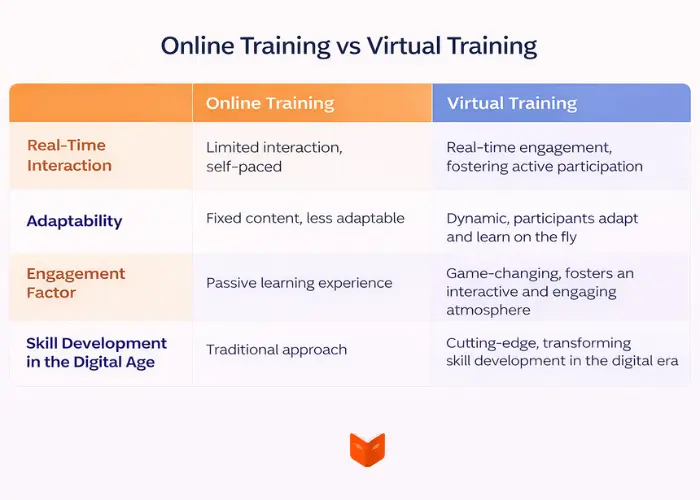
One way to teach people online is through virtual sessions. These differ from standard distance learning setups. Each has its own direction. Purpose shift based on goals.
Virtual Training
A virtual session often means real-time teaching done online. Happening by schedule, it takes place through video links much like old-style lectures.
Remote Training
Away from the office, learning covers more ground. Virtual meetings fit here, yet so do your own pace videos and guided routes through material. The core? Adaptability – what shifts when you go online. Employees come in different shapes, never just one kind or timed the same way.
Choosing Between the Two
When people talk online, virtual sessions help them stay on the same page. Training online suits ongoing practice, repeated exposure, and spreading knowledge. Relying solely on in-person meetings can lead to missed participants plus mental burnout. Good remote training sets up clear paths without losing personal touch.
How to Know If Your Organization Needs Remote Training
Some groups are actually using online learning for staff, just not recognizing it as such. Evidence shows up in daily work more than in planning documents.
Most training falls under management responsibility, yet knowledge accuracy often differs greatly. Employee onboarding might involve shadowing or piecing together documents hidden across various apps, making it uneven. As expenses climb and few employees show up, signs of weakness grow clearer.
A different hint shows up when people forget things. If employees who know how things work leave, their skills tend to vanish too. Learning from home employees can make sure shared understanding stays safe and organized.
When growth slows down teamwork or adaptability, a shift toward online learning often fits well.
Benefits of Remote Training
L&D Continuity in Times of Disruption
When things go off track, keeping training going isn’t the only thing continuity covers. It also means safeguarding shared understanding during uncertainty. With remote systems holding course, information stays gathered in one place – easy to reach no matter where people are, who is on duty, or how processes adapt.
Boosting Employee Productivity
When learning happens offsite, work moves faster because distractions drop out. Rather than taking the entire mornings, classes come in bite-sized chunks slipped between tasks. Skills get used right away, not later after long waits. That quick turn from knowing to doing lifts overall output.
Affordability and Scalability
After being made, distant learning materials stay usable later by different groups, cutting extra costs. Instead of spending on trips, rooms, or retraining speakers. Reaching more people now depends less on scheduling and more on who gets in.
Improved Knowledge Retention
What helps stay power often shows up just in time. When employees learn from a distance, they can go back to files, relearn ideas, because repeating tasks strengthens ability. Learning turns less about repeating facts more about enabling actions.
Improved Employee Retention Rates
Staying curious shapes how much employees invest in their roles. Seeing where they can grow, plus getting real chances to learn, lifts motivation while cutting exit rates.
Remote Training Challenges
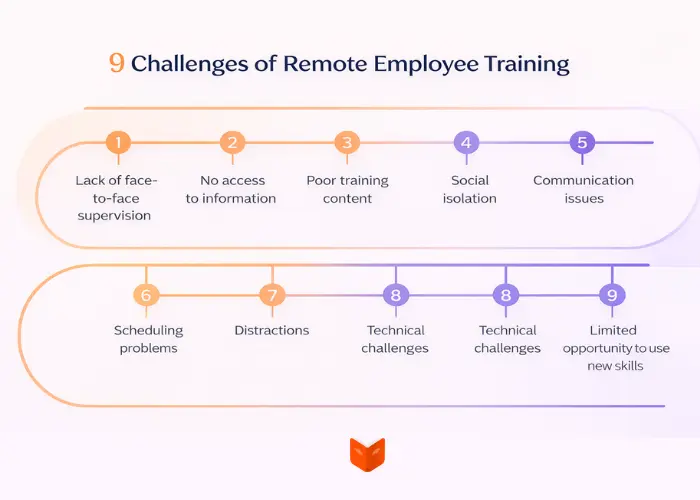
Even though remote learning works well under certain conditions, it does not always deliver results. A number of difficulties tend to lower its effectiveness more often than not.
May Be Perceived as Impersonal
When online courses depend only on static videos, they often miss the human touch. It isn’t because learning online never works – it’s just poor planning behind weak engagement, missing feedback loops, or any real connection between people.
Communication Issues
When goals stay unclear plus there is little to no communication, students often hesitate to speak up or get answers fast. That lag? It holds them back.
Distractions
When people work from a distance, things tend to get in the way. Sessions that drag on without clear goals – along with messy plans and distracted attention – only increase how tough it is for students to keep up.
What stands out shows how crucial layout and planning are, even when lessons take place online. These hurdles don’t prove anything negative about digital education – they simply shift attention toward what works behind the scenes.
Remote Training Best Practices
1. Use a Variety of Training Formats and File Types
Some abilities fit better into videos, others lend themselves more naturally to step-by-step text. Learning by doing often comes from hands-on tasks designed to build real-world use. Shifting how things are shown keeps minds active while making ideas easier to follow.
2. Make the Training Mobile-Friendly
Getting on mobile means fewer roadblocks. During brief pauses or on the move, staff might pick up lessons. For teams out in the field, on desks, or working schedules that shift, being offline matters less.
3. Create a Learner Community
People grow faster in groups. Talking together, sharing knowledge, working side by side – these help employees swap ideas while cutting down on being left out. When done as a team effort, learning tends to stick better.
4. Measure Training Effectiveness
Just counting finished tasks doesn’t show much. What really helps is checking results through tests, task signs, or what learners say. Seeing these pieces gives teams a way forward while proving the learning worked.
5. Make Parts of Remote Learning Self-Paced
One way to handle skill differences is letting people learn at their own pace. Fresh faces might go back and check basic info, whereas those already knowledgeable jump ahead without delay. Less confusion hits the room when people progress like that. Things simply run smoother overall.
6. Implement Gamification
Progress and winning feel good. Noticings like badges or tick-offs motivate, but stay quiet enough to keep focus intact. Playful touches slip in, still hold attention better than rewards.
7. Consider Using Remote Training Software
When people train from afar, handling things by hand quickly becomes a problem. Tools built for remote learning handle data flow, follow-up, and updates all in one place. A well-set-up LMS makes sure lessons stay organized and results stay predictable.When companies run on WordPress, a specialized wordpress LMS plugin helps manage courses more smoothly – keeping things organized, showing who’s moving forward, also making insights easier to share.
Conclusion
Far from just an emergency fix for remote teams, remote learning now builds capabilities across today’s companies. Available, organized, and tracked, it turns growth into routine work instead of disruption.
When companies see remote training as structure rather than information, their teams adapt better, work independently well. Growth becomes steady, setbacks shrink, progress keeps moving ahead.
FAQ
What is remote training?
Training from a distance. That’s what “remote training” often means.
An employee can access lessons anywhere by using web-based tools. Learning happens in digital spaces where distance doesn’t limit access.
What happens during faraway learning?
Working out happens in real time talks, alongside independent learning tracks, video playback, plus testing done via the web.
Is remote training effective?
Absolutely. Remote training works well when goals are obvious, people stay involved, and results get tracked – learning sticks then.
What tools are used for remote employee training?
Most companies rely on learning platforms, video sharing apps, along with teamwork software.
Can remote training replace in-person training?
Frequently so. A few groups mix work done online with time spent at offices, blending both ways.