Did you know? Teachable takes 5%. Udemy can take up to 50% on sales they drive. And neither lets you actually own your student list. WordPress flips that entirely, you keep nearly everything, your students are yours, and the thing you’re building has real equity.
Key Takeaways
- Selling on WordPress means zero platform fees, just payment processing
- A lightweight LMS plugin handles course delivery and payments without needing a developer
- Your sales page lives or dies on student outcomes, not module counts
- Email is still your highest-converting channel, by a wide margin
- Completion rates determine referrals, happy students are your best marketing
Picking an LMS Plugin You’ll Actually Stick With
Most instructors overthink this. They read comparison articles for two weeks, get lost in feature tables, and end up either choosing the most complex option or never launching at all.
Here’s the real question: do you need enterprise-level customization right now, or do you need to start selling this month?
If it’s the latter, FoxLMS is worth a serious look. It handles the core stuff cleanly: course builder, student progress tracking, quizzes, certificates, and payment integration either through WooCommerce or directly via Stripe/PayPal. No bloat, no steep learning curve.
LearnDash and LifterLMS are genuinely powerful. But “powerful” also means more configuration, more potential conflicts with your theme, and more time before your first sale. If you’re planning a multi-instructor platform or corporate training setup from day one, they make sense. For most solo instructors? You’re paying for capability you won’t use for years.
Whatever you pick, make sure it handles these without add-ons:
- Built-in payment processing or clean WooCommerce integration
- Drip content scheduling (releasing lessons over time)
- Student progress tracking and completion certificates
- Quiz and assignment tools
- A course player that works on mobile
Once you’ve picked your plugin, the next step is actually building the course itself.
Payments: Simpler Is Almost Always Better
A complicated checkout loses sales. Full stop.
I’ve seen instructors spend three days configuring WooCommerce subscriptions with dynamic pricing rules, then watch students abandon at checkout because the page loaded slowly or there were too many steps.
Two routes worth considering:
Direct LMS payment integration (Stripe or PayPal built into your plugin) is the cleaner option for most people. Fewer plugins means faster load times, less troubleshooting, and a simpler student experience. FoxLMS and several others offer this, you’re up and taking payments in under an hour.
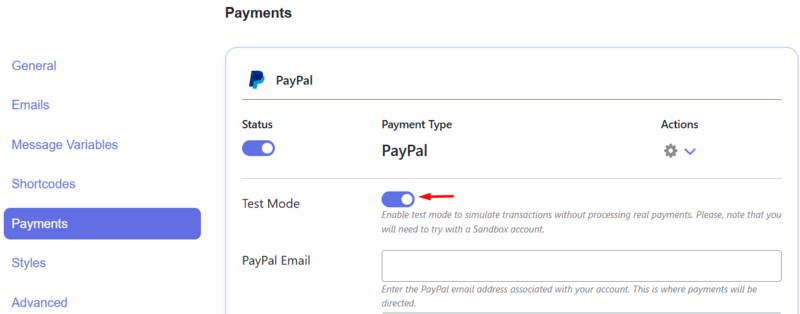
WooCommerce makes sense when you need subscription billing, detailed sales reports across multiple products, complex couponing, or tax handling for multiple regions. It’s more powerful but also more to maintain.
On pricing — here’s what the data actually shows:
| Pricing Model | Best For | Upside | Watch Out For |
| One-time purchase | Evergreen courses | Simple, no churn | No recurring revenue |
| Monthly subscription | Course libraries | Predictable income | Higher cancellation rate |
| Tiered access | Different buyer budgets | Appeals to more people | Can confuse buyers |
| Payment plan | High-ticket courses | Removes price barrier | Refund handling gets messy |
Most instructors starting out do well with a simple one-time price between $70–197. Test it with a small audience before assuming you need subscriptions.
Sales Pages That Actually Convert
Your sales page is working while you sleep. Or it isn’t.
The single biggest mistake: writing about your course instead of writing about your student’s life after taking it. Nobody buys “12 comprehensive modules.” They buy “automated client reports that save me 5 hours a week.”
Headlines should name the outcome specifically. “Build Excel Dashboards Your Boss Will Actually Use” beats “Complete Excel Course” because one sounds like a transformation and the other sounds like homework.
Social proof is make-or-break. Generic testimonials like “Great course!” do almost nothing. What converts is: real name, real photo, specific result. “Maria cut her invoicing time from 3 hours to 20 minutes” is worth ten glowing but vague reviews.
The objections to address before they become reasons to leave:
- Time: “15 minutes per lesson, finish in 4 weeks at your own pace”
- Skill level: “Built for complete beginners, no prior experience needed”
- Risk: “30-day money-back guarantee, no questions asked”
- Value: “Lifetime access plus every future update”
And don’t use “Buy Now” on your button. “Start Learning Today” or “Get Instant Access” connects to what the student is actually doing. Small change, meaningful difference in clicks.
Marketing: Pick a Lane and Go Deep
The instructors who quit after six months all have one thing in common: they tried to do everything at once. Posted on three social platforms, ran ads, started a podcast, and burned out before making their first ten sales.
Email is still your highest-converting channel — usually 5–10x better than social, in practice. Build your list from day one. A solid lead magnet (a mini-lesson, a checklist, a short email course) brings in subscribers who are already interested in what you teach. Most course sales happen after five or six email touchpoints, not the first one.
Blog content compounds over time in a way social posts never will. Write about the specific problems your course solves. Answer the questions your audience is already Googling. One good article can drive free traffic for years — social posts are gone in 48 hours.
For social: pick one platform and be consistent on it. LinkedIn for professional development courses. Instagram or TikTok for creative topics. YouTube for anything technical where people want to see the process. Trying to maintain all of them splits your time and usually means you’re mediocre everywhere.
Live webinars still convert better than almost anything else. You answer questions in real time, demonstrate how you teach, and can make a time-limited offer to people who just watched you for 45 minutes. Monthly webinars are a staple for most successful course businesses.
One underused option: affiliates. Offer 30–50% commission to other instructors or industry people with relevant audiences. You create once, they promote to people who already trust them.
Keeping Students Engaged After They Buy
The sale isn’t the finish line. What happens after someone enrolls determines whether they finish the course, leave a good review, and buy from you again.
Drip content is one of the most effective things you can do for completion rates. Instead of unlocking everything on day one (which leads to overwhelm and abandonment), release one module per week. Students stay engaged, the course feels manageable, and you get better reviews.
Set up a basic support system before you launch. A FAQ section covering the ten most common questions. A community space, even just a Facebook group, where students help each other. Block out specific hours for support responses instead of being always-on.
Track where students drop off. Most LMS plugins show you completion rates per lesson. If 60% of students stop at lesson 4, something is wrong with lesson 4, maybe it’s too long, too confusing, or missing context from earlier. Fix it.
Certificates matter more than most instructors expect. Students post them on LinkedIn. That’s free, organic marketing you didn’t have to pay for. Make them look professional.
Growing Beyond Your First Course
Once you have one course running smoothly, scaling is about systems, not just working more hours.
Course bundles reliably increase average order value. Bundle your beginner course with intermediate and advanced levels at a package discount. Students who just finished module one are already primed to keep going if you make it easy and affordable.
Corporate clients are a different revenue model entirely, higher prices, longer relationships, less individual support. If your course content applies to teams or companies, it’s worth building a version of your offer for that audience.
Corporate LMS setups have their own specific requirements and use cases worth understanding.
Watch your data as you grow. Which marketing channels bring in students who actually complete the course and buy again? Which ones bring in refund requests? Revenue per student matters more than total sales.
Mistakes That Kill Scaling
- Building what you want to teach instead of what people want to learn, validate demand first, always
- Competing on price, discount buyers ask for more support, leave worse reviews, and rarely return
- Switching LMS platforms mid-growth, stability beats features when students are depending on access
Start With One Course, Own the Whole Thing
You don’t need everything set up perfectly before you launch. One course, a clean sales page, and a way to take payment is enough to start.
The technical side feels overwhelming at first. It gets easier fast. And what you end up with, a course business that’s actually yours, where you keep the revenue and own the relationship with every student, is worth the learning curve.
Build the email list from day one. Deliver something genuinely useful. The rest follows.
No. Plenty of LMS plugins including FoxLMS have built-in Stripe and PayPal integration. WooCommerce adds flexibility for subscriptions and complex pricing, but for straightforward course sales it’s optional — and often overkill.
WordPress means you own everything: revenue (minus payment fees), student data, and the platform itself. Teachable and similar hosted platforms charge monthly fees plus a transaction cut, but they handle hosting and tech. Which is right depends on your technical comfort and how much control matters to you. Learn which is the right LMS tool for you.
Budget roughly $10–50/month for hosting, $0–300/year for your LMS plugin depending on which one you choose, and the standard payment processing fee of 2.9% + $30 per transaction. Compare that to Teachable’s 5% transaction fee on top of monthly plans and WordPress gets cheaper fast as revenue grows.
Yes, most LMS plugins support content import. Videos, PDFs, and written content transfer without much trouble. Student records are trickier, some platforms let you export that data, others don’t. Worth checking before you commit to migrating.