FoxLMS works no matter the theme or the page builder a user uses. Below the section explains how the WordPress theme structures work today, what actually affects the compatibility and which the themes and the editors FoxLMS has tested.
WordPress Editors (Overview) #
WordPress supports different editors for creating and managing content. Some editors focus on a simple writing experience, while others offer more visual design control, and the one you choose solely depends on your business needs
Right now, the go-to WordPress editors are:
- Gutenberg (Block Editor) – This is how WordPress usually lets people write, using blocks instead of old-style editing tools
- Elementor – a visual drag-and-drop page builder
- Classic Editor is just a regular writing tool – no flashy interface, simply text and options in a basic interface.
FoxLMS Editor Compatibility #
FoxLMS integrates directly with the editors you already use. Creating and updating course content is right inside WordPress, following the same workflow you’re familiar with, no new systems to learn.
Gutenberg (Block Editor) #

Gutenberg is WordPress’s default editor and is fully supported in FoxLMS.
- Build lessons using blocks such as text, images, videos, and layouts
- Works seamlessly with Block Themes
- Uses the native WordPress editing experience
Best for: Modern WordPress setups and block-based designs.
Elementor #

FoxLMS includes a dedicated integration with Elementor that works out of the box.
- Create lessons visually using drag-and-drop editing
- Full access to all Elementor widgets and layouts
- No special configuration or workarounds required
Best for: Users who want full design control and custom page layouts.
Classic Editor #
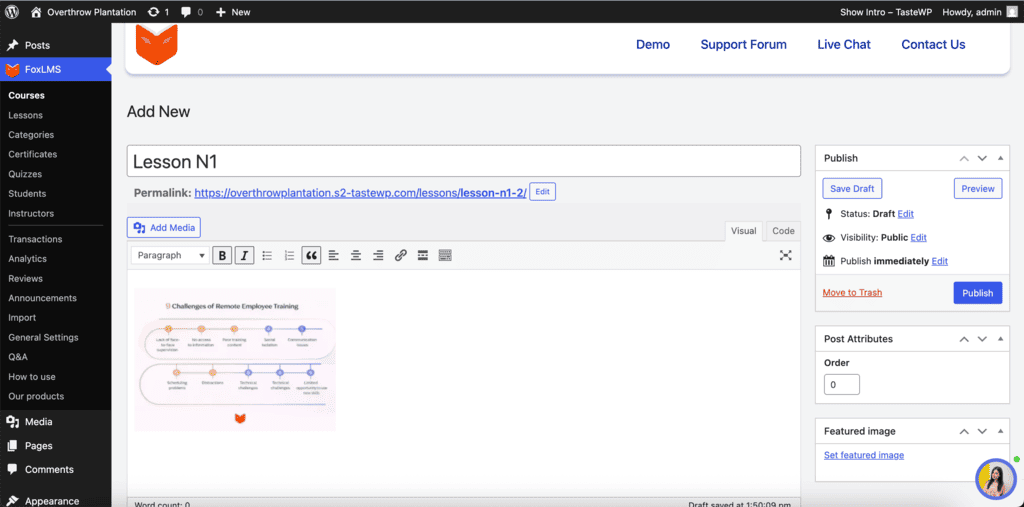
FoxLMS remains fully compatible with the Classic Editor for users who prefer a simpler or older more familiar setup.
- Edit lessons using standard text-based editing
- Lightweight and straightforward workflow
- Works well with older websites or minimal configurations
Best for: Legacy sites or users who prefer basic editing tools.
With FoxLMS no editor is forced or a must, you can use the editor that best meets your more global needs.
WordPress Theme Structures: Classic vs Block #
Currently, WordPress themes fall into two main structure types:
Classic Themes #
- Used widely for many years
- Built with PHP templates
- Commonly paired with the Classic Editor or page builders
Block Themes #
- Gained popularity over the last 3-4 years
- Built around the Gutenberg block system
- Layout elements (header, footer, content) are managed using blocks
FoxLMS works equally well with both Classic and Block themes.
FoxLMS Theme Compatibility #
Once a lesson is created, the active WordPress theme controls how it appears on the site. FoxLMS is not tied to any specific theme, it runs smoothly with the layout and design you choose.
General Theme Compatibility Overview #
- FoxLMS can be installed on any WordPress theme
- No theme-specific integrations or configurations are required
- LMS functionality operates independently of theme structure
What matters most is theme quality, not whether it’s Classic or Block-based.
Tested & Stable WordPress Themes #
FoxLMS has been tested and works reliably with the following popular themes:
- Astra
- Hello Elementor
- Twenty Twenty-Four
- Twenty Twenty-Five
- Kadence
This list does not limit compatibility. It reflects themes already tested in real-world environments and known to work smoothly with FoxLMS.
Summary #
- FoxLMS is compatible with all WordPress themes
- No required or mandatory theme setup
- Works with both Classic and Block themes
- Minor styling conflicts may occur depending on theme quality and are handled via updates
- Supports Gutenberg, Elementor, and Classic Editor with dedicated lesson integrations


